# Builder sessions
> Start, find, rename and reopen your conversations with the Agent Builder, and understand session statuses and what keeps running when you leave.
- Source: https://www.aui.io/help/building/builder-sessions
- Section: Building with the Agent Builder
- Last updated: November 24, 2026
A session is one conversation with the Agent Builder about one agent. It keeps its transcript, the branch it works on, and any unsaved changes it made. Each session runs in its own virtual machine on AUI's side, not in your browser, so it survives a page reload and is there when you sign in from another computer.
## Start a new session
Start a new session when you move on to a new topic. A focused session is easier to find later, and the builder answers faster in a short one.
- Click **New session** (**+**) in the builder header, or
- click the session name at the top of the transcript and choose **New session**.
A new session starts in Build mode with an empty transcript. It is labeled **New session** until it is named after your first request.
When a session grows long, the builder suggests starting a new one, which answers faster. Click **New session** in that note, or **Dismiss** to carry on.
If the session you leave has unsaved changes, they stay with the branch, and the new session shows a note above the composer with **See changes** and **Discard**. See [Unsaved changes and Push](https://www.aui.io/help/building/unsaved-changes-and-push#discard-unsaved-changes).
Starting a new session does not stop the old one. If it was working, it keeps working.
## Find and reopen a session
1. Click **All sessions** (the list icon) in the builder header, or click the session name and choose **All sessions**.
2. Click a session to open it. Its full transcript is rebuilt.
To go back without opening another, close the list with **×**.
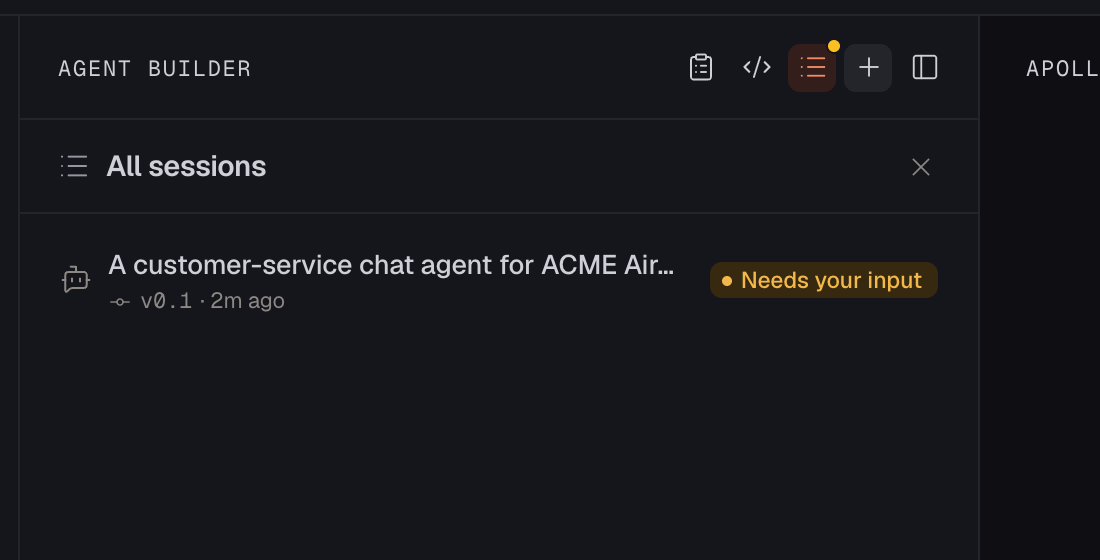
*A session that is waiting for your answer is marked Needs your input.*
## Rename a session
The builder names each session after what you asked for, for example "Disclose cancellation convenience fees". To change it:
1. Click the session name at the top of the transcript and choose **Rename session**, or hover the session in **All sessions** and click the pencil.
2. Type the new name and press ↵. Press Esc to cancel. Saving an empty name restores the builder's name.
While the session name menu is open, you can also press R to rename, N for a new session or A for all sessions.
## Session statuses
| Status | What it means | What to do |
|---|---|---|
| **Working** | A turn is running in this session. | Nothing. Open it to follow along. |
| **Needs your input** | The builder asked a question and is waiting. | Open the session and answer. See [Answer the builder's questions](https://www.aui.io/help/building/answer-the-builders-questions). |
| **Interrupted** | A turn stopped before it finished. | Open the session and choose **Resume** to continue, or **Cancel turn** to abandon it so your next message starts fresh. |
| **Failed** | The last turn ended with an error. | Open the session to read the error, then send a new message. |
| **Unsaved changes** | The session has edits that are not pushed. | Test them, then push or discard. |
| **Pushed** | The session's changes were pushed as a commit. | Make the commit live when it is ready. |
| **Live** | A commit pushed from this session is live. | Nothing. |
A session without a chip has nothing waiting.
## If a turn ends with Gates rejected the result
When the builder hands its work back, it checks the agent's program. If checks that its own edits introduced are still failing, it stops and ends the turn with a block headed **Gates rejected the result**. The block lists the problems under "Blocking findings remain (introduced by this turn's edits)", often in technical wording, followed by the files the turn changed. The builder then waits for you.
Nothing is lost and nothing reaches customers. The turn's edits are kept as unsaved changes in the session: the turn pushed nothing and made nothing live.
To go on, do one of these:
- Ask the builder to fix the findings and continue, for example "Fix the blocking findings, then carry on with the rest of the plan." It fixes them and picks up where it stopped. You do not need to understand the findings yourself.
- If you no longer want the edits, discard them. See [Unsaved changes and Push](https://www.aui.io/help/building/unsaved-changes-and-push#discard-unsaved-changes).
## What keeps running when you leave
Each builder session runs in its own virtual machine on AUI's side, not in your browser, isolated from other people's sessions. If you refresh, close the tab or lose your connection, a running turn keeps running, and you catch up by reopening the session.
A few steps pause until you reopen the session instead: the builder waiting for your answer, running a live test conversation, re-running a turn, or setting up a sandbox database. To hear about questions while you are away, turn on notifications; see [Appearance, notifications and keyboard shortcuts](https://www.aui.io/help/getting-started/appearance-and-shortcuts#notifications).
To stop a turn yourself, click the square stop button in the builder composer or press ⌘ . (Ctrl . on Windows and Linux). Edits already made are kept, and your next message picks up from where it stopped.
If no builder is free when you send, your turn waits, and the builder shows how many turns are ahead of yours.