# The sandbox database
> Give your agent a database of made-up data to build, test and demo against, with each conversation's changes kept to itself.
- Source: https://www.aui.io/help/integrations/sandbox-database
- Section: Integrations and data
- Last updated: November 23, 2026
A sandbox database is a hosted database that belongs to your agent and holds data you invent: customers, bookings, flights, fare rules. The agent reaches it through an ordinary integration, the same way it would reach your real systems. That lets you build and test a complete agent before it is connected to anything real, and try risky scenarios without touching real data. The Apollo CLI calls it `mockdb`.
Use one when:
- your real system isn't ready, or the agent can't have access to it yet;
- you want repeatable test data, such as a Gold member with a refundable trip and a Basic member with a non-refundable one;
- you want to demo the agent with realistic data.
## How conversations are kept apart
The database has two layers:
- **Base rows** are the data you seed. Every conversation starts from them.
- **Each conversation gets its own layer** on top, tied to its thread. Whatever the agent writes in a conversation lands in that layer only.
Say the agent cancels Alex Morgan's booking `ABC123` on flight `AC1842` in one conversation. That conversation now sees the booking as canceled. Every other conversation, and the base rows, still see it as booked. You can cancel the same booking in a hundred test conversations and each one starts from the same data.
Dates can be stored relative to the current time, so a trip seeded as "departing next week" stays upcoming. Such columns carry a **relative** badge in the Tables tab.
> [!IMPORTANT]
> The sandbox database belongs to the agent, not to a branch. Every branch and commit whose integration points at it reads the same base rows. If the commit you make live still points at it, customers' conversations use it too.
## Create one
The usual way is to ask the builder in **Build** mode, describing the data you need:
> Create a sandbox database for ACME Air with customers, bookings and flights. Seed a Gold member, Alex Morgan, with booking ABC123 on flight AC1842, refundable, departing next week.
The builder creates the database, its tables and seed rows, the endpoints the agent calls, the integration that connects them, and the secret that integration uses. Settle the columns before seeding: once a table has rows, you can add columns but not rename or remove them.
You can also create and seed one from the CLI with `apollo mockdb`. See the [command reference](https://docs.aui.io/cli/commands).
If the sandbox panel shows **No sandbox database yet**, click **Create sandbox database** to create an empty one, then ask the builder to add tables and endpoints.
## Open it
1. Open the **Agent panel** (⌘ J) and its **Integrations** tab.
2. Click the sandbox integration. Its **Kind** reads sandbox database.
3. In the **Connection** block, click **Open sandbox database**.
The **Sandbox database** panel takes the right side of the Playground, with three tabs: **Tables**, **Endpoints** and **Personas**. Use the refresh button after the builder changes something, and the close button to bring back the conversation and the Reasoning pane.
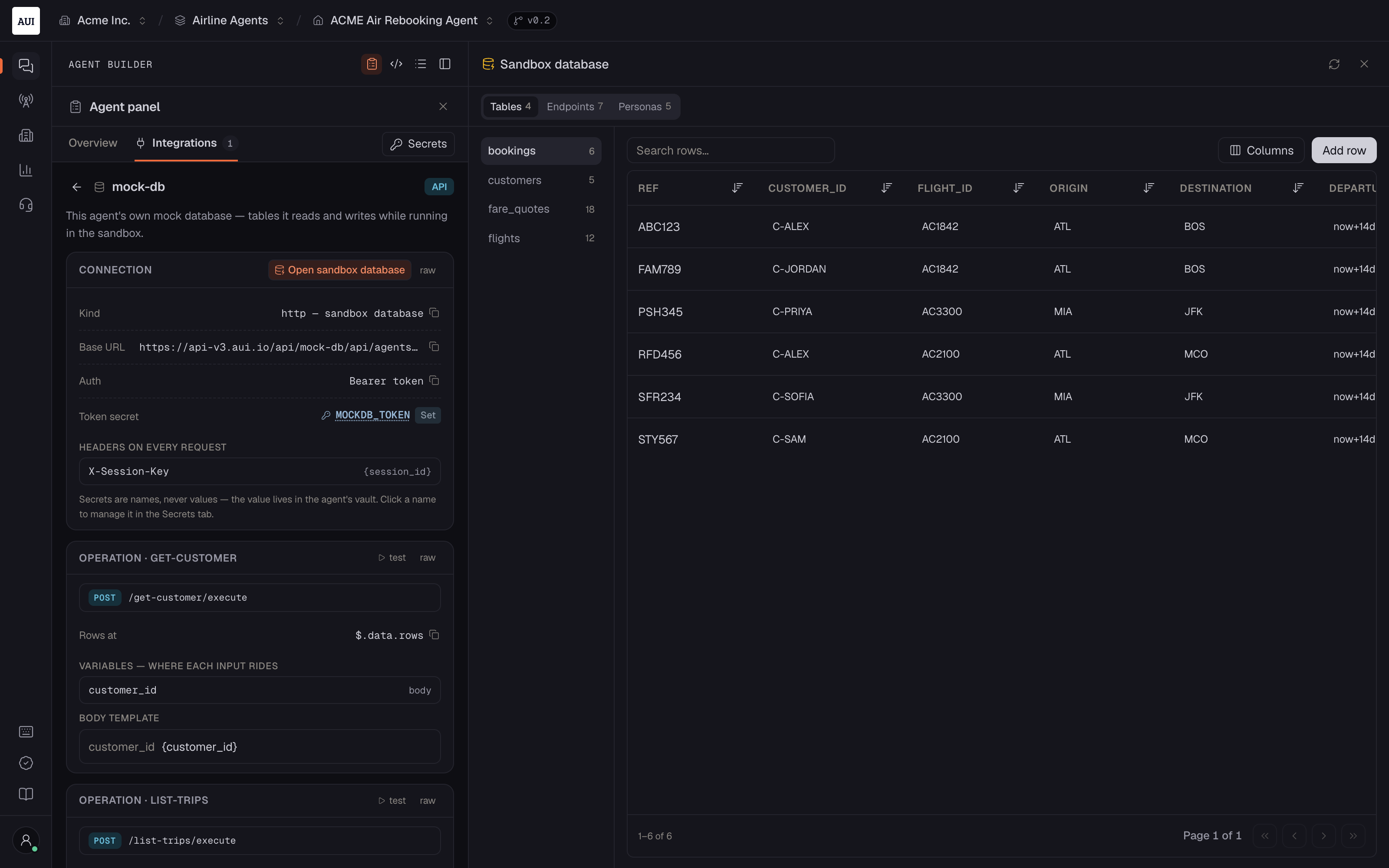
*The bookings table, opened from the sandbox integration.*
## Tables
Pick a table on the left; the number beside it is its count of base rows.
- **Search rows…** filters the table. Click a column header to sort.
- **Columns** hides, pins and reorders columns. **Reset to default** undoes your layout.
- Click a cell to edit it. Press Enter to save or Esc to cancel. Primary-key columns can't be edited.
- **Add row** opens a form with the table's fields; required ones are marked.
- The trash button on a row deletes it, after a confirmation.
> [!WARNING]
> Edits in the Tables tab change the base rows for every conversation and every branch, at once, and can't be undone. To try a change in one conversation only, let the agent make it during that conversation.
## Endpoints
Endpoints are the named operations the agent calls, such as `get-booking` or `commit-cancel`. Each is marked **read** or **update**. You can run one by hand to check what the agent would get back:
1. Pick an endpoint.
2. Fill in its inputs. Required ones are marked.
3. For an update endpoint, enter a **Session key**: the thread ID of the conversation whose layer the write should land in. Or click **Use a scratch session** for a throwaway layer.
4. Click **Run**.
The result shows how many rows matched, with the rows themselves. Reads run here return base rows only. Writes never change the base rows; they land in the layer you named.
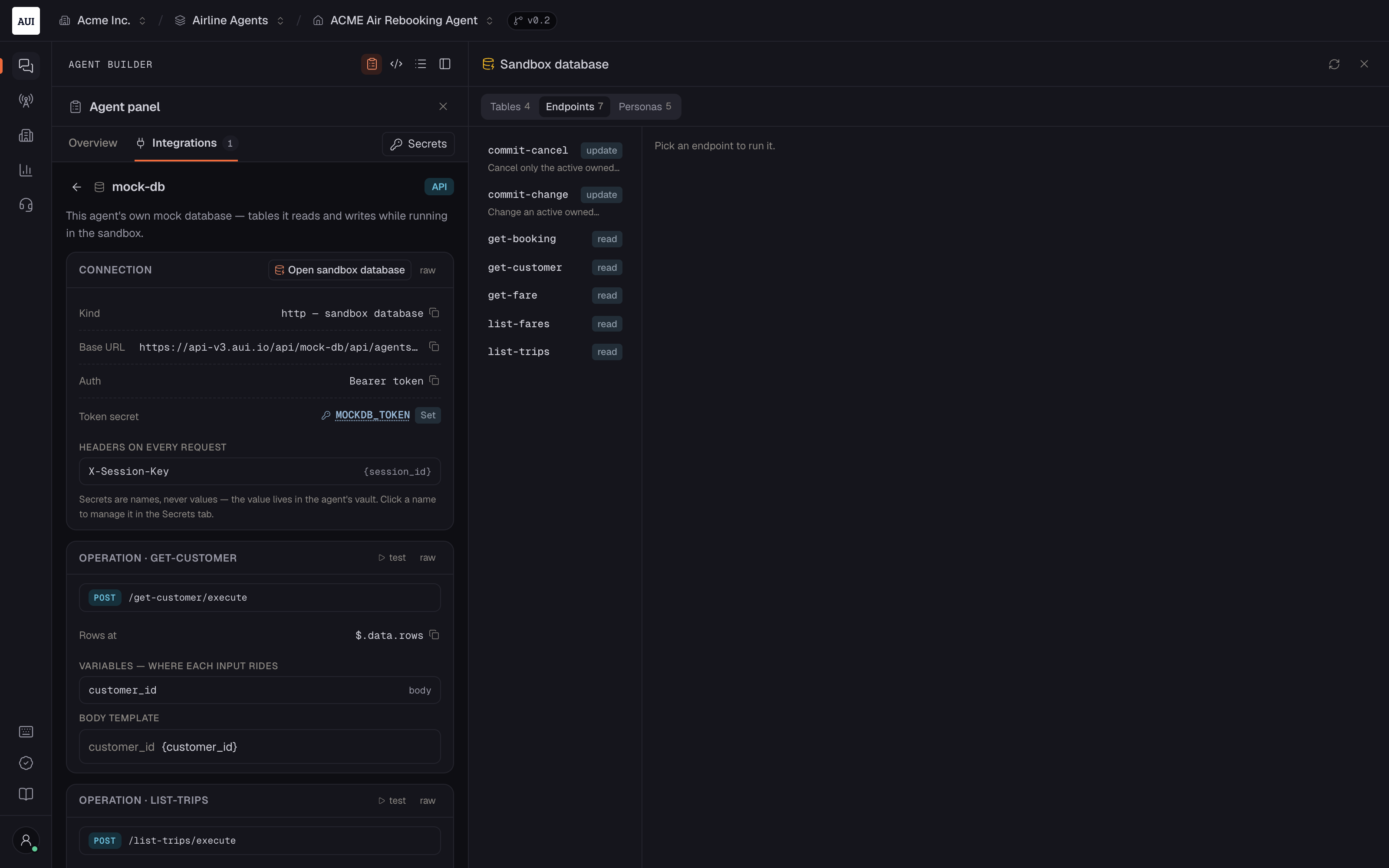
*Endpoints are marked read or update.*
## Personas
Personas are sample users for the deployed demo widget's picker, so someone trying the agent can choose who to be. Each persona has a name and fields grouped under **Who you are**, **Verify**, **Good to know** and **Records**. One persona is the **Default**.
- **Add persona** and **Add field** add to the list; **Make default** and **Remove** act on one persona.
- **Save personas** saves your changes. Saving replaces the whole list.
- Use values that exist in the seeded rows, or the agent won't find that person.
Personas are related to [test callers](https://www.aui.io/help/testing/agent-variables-and-test-callers) but separate from them. Test callers are the saved customers you pick in a Playground conversation with **Pick a test caller…**; personas serve the widget.
## Move to your real system
When your real system is ready:
1. Ask the builder in **Build** mode to point the integration at your real API, or to add a new integration for it. Save its credentials in the vault when the builder asks.
2. Push, then use **test** on the new integration's operations to check each one responds. See [Integrations](https://www.aui.io/help/integrations/integrations-overview).
3. Hold a few conversations and run a regression. From now on, these conversations call the real system.
4. Make the commit live. See [Make a commit live, lock a branch, and roll back](https://www.aui.io/help/branches/make-a-commit-live).
The sandbox database stays with the agent, so other branches can keep using it for testing.