# Simulate a caller
> Let a separate model play the customer, steer it with guidelines, choose which test caller it plays, and start, continue or stop the conversation.
- Source: https://www.aui.io/help/testing/simulated-callers
- Section: Testing your agent
- Last updated: November 23, 2026
In **Simulated caller** mode, a separate model plays the customer and holds a whole conversation with your agent while you watch. Apollo-1 answers as your agent, exactly as it would answer a real customer. Use it to see a full conversation in a minute, to try a kind of customer that is tedious to play by hand (impatient, vague, changing their mind), or to look at a change from a customer's side before you push it.
A simulated conversation is one conversation you watch. To run many at once and get a verdict, use an [evaluation](https://www.aui.io/help/evaluations/regressions-and-evaluations).
## Run a simulated conversation
1. Click **New thread** (**+**) in the Apollo-1 Runtime header. New threads open on **Simulated caller**. In an existing thread, click **Simulated caller** above the message box, or press ⌥ ⌘ S (Ctrl Alt S on Windows and Linux).
2. Optional: in the message box, write guidelines for the customer: who they are, what they want, how they behave. For example: "You want to cancel your Boston trip but only if there is no fee. Be short, and interrupt if the answer gets long." Leave it empty and the simulated caller invents a plausible customer.
3. Optional: choose which test caller it plays. Click **Agent variables** (`{ }`) and pick one under **Caller**. A new thread already has the first test caller selected. See [Agent variables and test callers](https://www.aui.io/help/testing/agent-variables-and-test-callers).
4. Click **Start**.
The turns arrive on their own: the customer's message, then the agent's reply, then the next message. Click **Reasoning** under any reply to see that turn in the Reasoning pane while the conversation goes on.
[Clip: A simulated caller talking to the agent. The turns arrive on their own.](https://www.aui.iohttps://pxjl3qwxvjcixvl1.public.blob.vercel-storage.com/help/testing/simulated-callers/simulation-running-39cf7f6b189f.mp4)
*Dark mode, the Playground on v0.2 during a simulated conversation. The thread is titled 'I'm thinking about canceling my Boston trip...'. The agent asks which booking is meant, the simulated caller answers 'ABC123, the Boston one.', the agent quotes the cancellation, and a further caller message is answered. The composer is set to Simulated caller with a Continue button, and the Reasoning pane is open on the latest turn.*
## How long it runs
A run lasts up to eight turns, and ends sooner if the conversation reaches a natural close. When it ends, the button reads **Continue**: add new guidelines if you like, and click it to run more turns in the same thread, picking up where the conversation stopped.
To end a run early, click **Stop** or press ⌘ . (Ctrl . on Windows and Linux). The button reads **Stopping…** while the turn in progress finishes, so the transcript stays complete.
You can mix the two modes in one thread. After a run, switch to **You** and type a message yourself, then switch back and click **Continue**. While a run is in progress, the mode cannot be changed.
## Which customer it plays
When a test caller is selected, the simulated caller plays that customer. It knows the details saved with the test caller, such as their booking code, and gives one only when the agent asks for it, the way a real customer would. Your guidelines are added on top: who they are comes from the test caller, what they want and how they behave can come from you.
The agent receives that test caller's agent variables with every message, as your own system would send them. So if the test caller is "Alex Morgan, Gold member" with customer ID `C1001`, the agent treats the conversation as coming from a verified Gold member, and the simulated caller can answer questions about Alex's trips.
## What you get
A simulated conversation is an ordinary thread, saved and listed like any other. It runs against the branch you have open, with the builder's unsaved changes, and with your current **Effort** setting, so it tests the same thing a message you type would.
- In **All threads**, it carries a robot icon ("Driven by a simulated caller"). To list only these, filter by **Source** > **Simulations**. See [Find and filter threads](https://www.aui.io/help/testing/threads-and-filters).
- The run keeps going if you open another thread. The thread is listed as soon as it starts, with a live dot while it runs, so you can come back to it.
- You can [edit and re-run](https://www.aui.io/help/testing/edit-and-rerun) any customer message in it, like a message you typed.
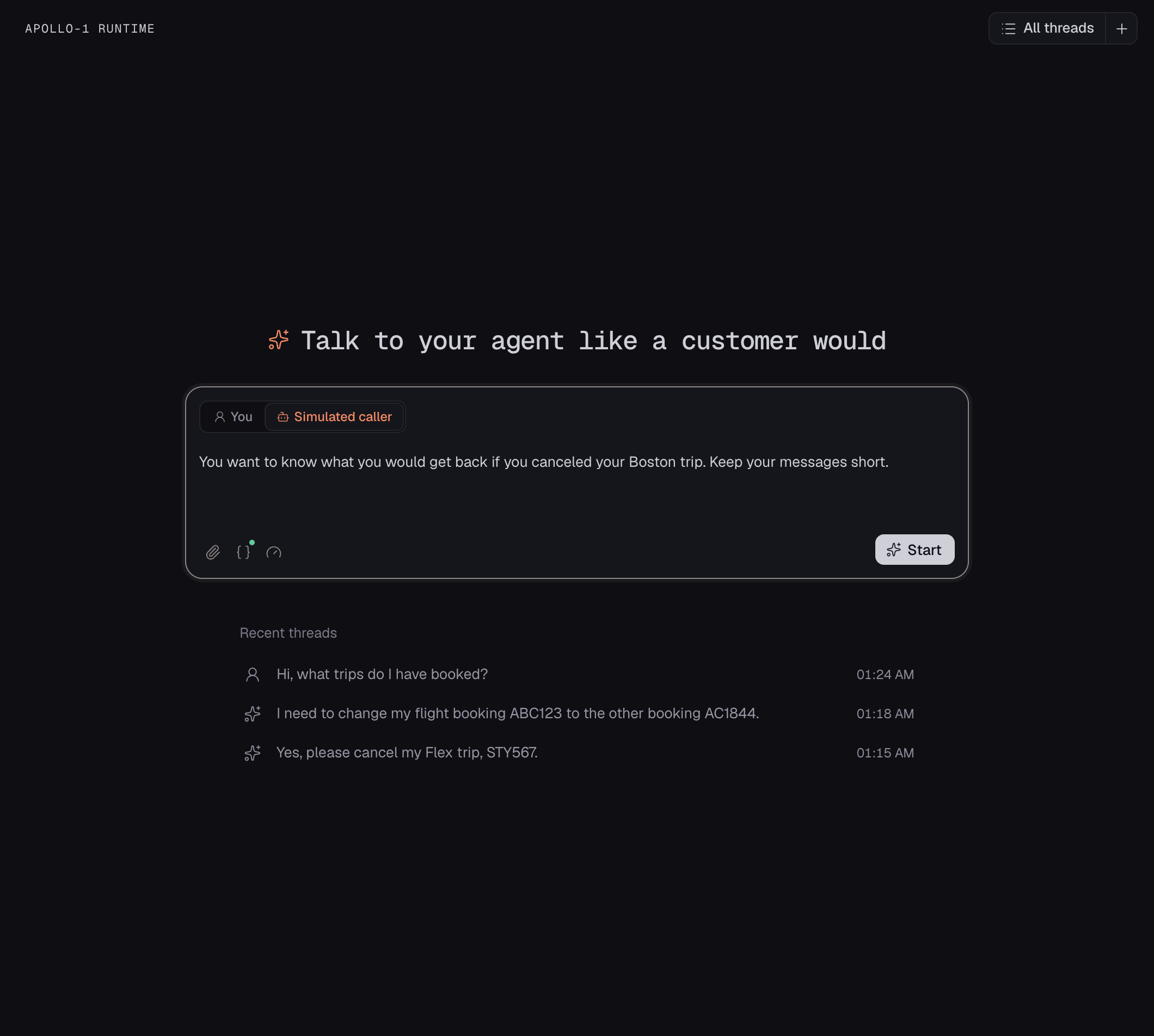
*Guidelines tell the simulated caller who to be and how to behave.*