# Find and filter threads
> Find any conversation with your agent in All threads, from the Playground, the CLI, the API or your customers, and narrow the list with filters.
- Source: https://www.aui.io/help/testing/threads-and-filters
- Section: Testing your agent
- Last updated: November 23, 2026
Every conversation with your agent is a thread, and **All threads** lists them all: yours and your teammates' in the Playground, the builder's own test conversations, simulated conversations, conversations from regressions and evaluations, conversations started from the CLI or the API, and conversations your customers had through the web widget, SMS or WhatsApp. Open any of them to read it turn by turn, with the Reasoning pane beside it.
## Open the list
Click **All threads** in the Apollo-1 Runtime header. The list slides over the conversation and closes when you open a thread. To keep it open beside the conversation, click **Pin panel**; click **Close panel** to put it away.
Threads are grouped by day, newest first. Each row shows:
- the title, taken from the customer's first message
- a line with the commit the thread ran on, the number of turns and the time it started
- a robot icon on a simulated conversation, and a live dot while a reply or simulation is running in it
- a sparkle icon on a conversation the builder started to test a change, and a webhook icon on one your systems started with an event
A thread forked by [editing or re-running a message](https://www.aui.io/help/testing/edit-and-rerun) is nested under the thread it came from, with "forked from turn N" in place of the commit. Hover over a row and click **Thread options** (**⋮**) to share, translate or hide that thread. See [Share, translate or hide a thread](https://www.aui.io/help/testing/share-a-thread).
## Search
1. In the **All threads** header, click **Find a thread by title or external ID** (the magnifier), or press ⌘ K (Ctrl K on Windows and Linux).
2. Type a word from the title, or the caller's ID. Any part matches, in upper or lower case.
3. Click **Search**. Click **Reset** to clear it.
An external ID is the caller's own ID that an outside system sent when it opened the thread, such as a ticket number or a customer number. Threads started in the Playground do not have one.
## Filter
Click **Filter conversations** (the funnel) in the **All threads** header. Point at a filter to see its choices, and click one to apply it at once. The list starts unfiltered.
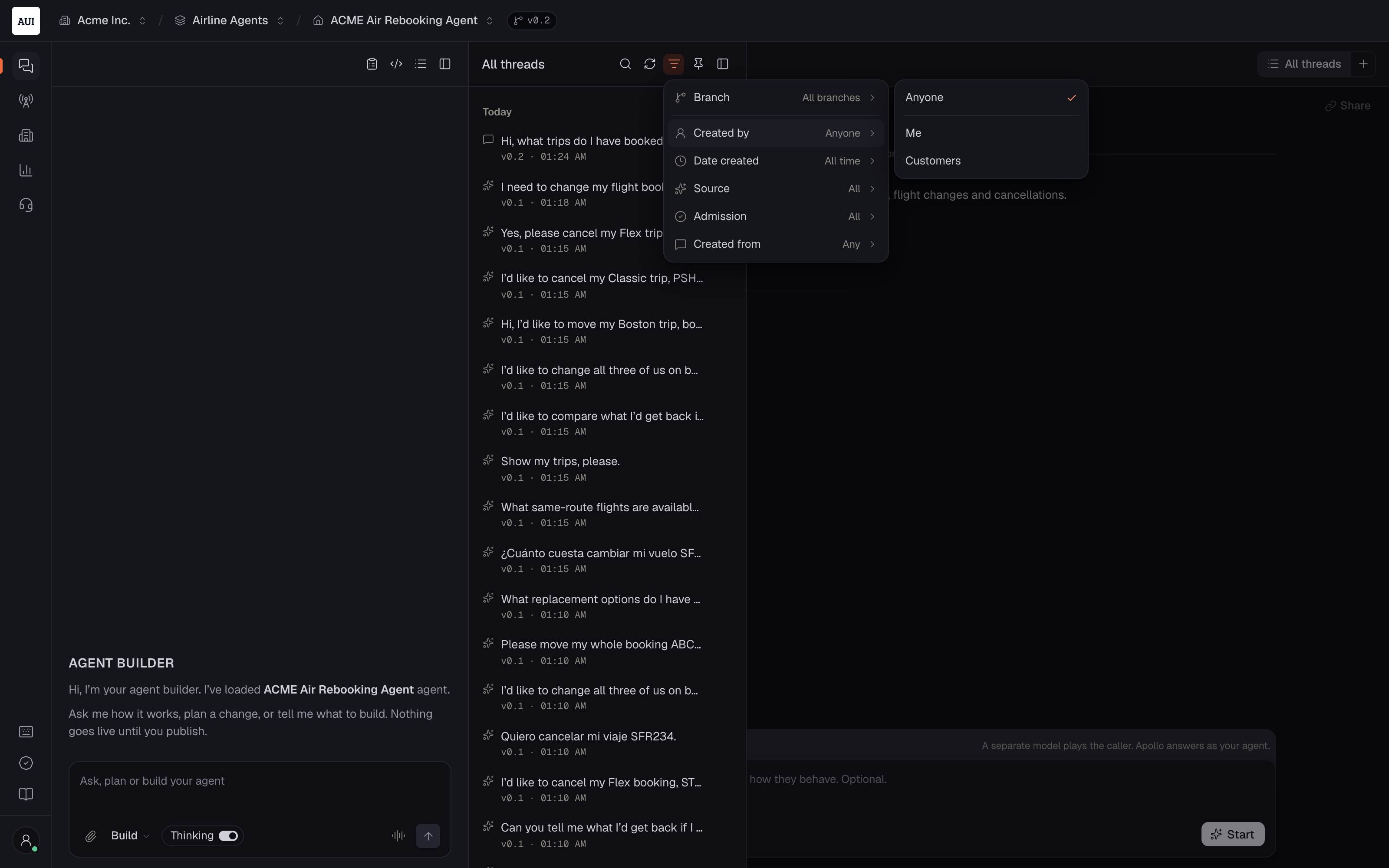
*Each filter shows its current value; its choices open beside it.*
| Filter | Choices |
|---|---|
| **Branch** | **All branches**, or one branch. Click the arrow next to a branch to pick one of its commits. |
| **Created by** | **Anyone**, **Me** (threads you started in the Playground or the CLI), or **Customers** (threads from your deployed agent). |
| **Date created** | **Today**, **7 days**, **30 days** or **All time**. |
| **Source** | **All**, **Manual** (a person wrote the customer's side) or **Simulations** (a simulated caller did). |
| **Admission** | **All**, **Taken** (the agent took the conversation) or **Rejected** (its admission rules turned the conversation away). |
| **Created from** | Where the thread came from: **Playground**, **CLI**, **API**, **Webhook**, **SMS**, **WhatsApp** or **Web widget**. You can select several. The choices follow **Created by**: **Me** offers Playground and CLI, **Customers** offers the rest. |
Applied filters appear as chips under the header. Click a chip's **×** to remove one, or **Clear** to remove them all. **Reset** at the bottom of the filter menu does the same. Search is kept when you clear filters.
If a thread you expect is missing, click **Refresh conversations** (the circular arrows) in the header to reload the list.
## Useful combinations
- **What customers saw this week:** **Created by** > **Customers**, **Date created** > **7 days**.
- **Conversations the agent turned away:** **Admission** > **Rejected**. Open one and check the Reasoning pane to see which rule decided it.
- **Conversations on the commit you are about to make live:** **Branch** > your branch > the commit.
- **Your own manual tests:** **Created by** > **Me**, **Source** > **Manual**.